Does Blocking an App on Mac Also Block the Programs It Runs?
It depends on the firewall. Every connection on a Mac belongs to one program, and a firewall decides program by program. An app that downloads through a separate tool, such as curl, is two programs to the firewall, so a block that names only the app can leave the tool connecting freely. MiniFirewall 1.0.2 closes that gap.
Why an app block can miss what the app runs
Apps rarely make every connection themselves. They run their own background services, they run installers and update checkers, and many run tools that ship with macOS, curl above all, to fetch a file. To macOS each of those is a separate program with its own name, and a firewall is told the program’s name, never who started it.
So a block on “Avast” matches Avast’s own programs, which is what the block was asked to do. The curl that Avast runs is Apple’s program, started by Avast for a moment, and it matches nothing. Before 1.0.2 that is exactly how MiniFirewall behaved: Avast’s own rows said Blocked, and a curl it ran would have connected. Why curl is connecting to the internet on your Mac explains how we found that out.
What a block on an app covers since 1.0.2
Since version 1.0.2 a block on an app also covers the programs that app starts. Block Avast, and the curl it runs is blocked with it, because MiniFirewall now knows who started each program and checks the block against the starter as well. Programs that live inside the app itself already counted as the app, and still do.
The dialog says so before you confirm. For a whole app or program the direction choice carries the line “Also blocks programs that Avast starts, such as a download tool it runs.” When you open the block again later, the same line sits under the direction choice, so the cover is never a surprise.
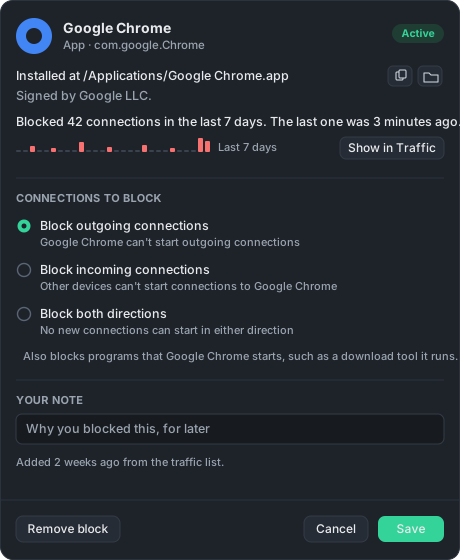
A website block limited to one app follows the same rule. Block example.com for Avast only, and a curl that Avast runs to reach example.com is covered too.
Why the cover never runs the other way
A block on a tool is a block on that tool from any app, and it never reaches back to the app that ran it. Block curl, and curl is blocked whether Avast, Homebrew or your own script started it, while Avast’s own connections continue. The reverse would let one block on a shared tool silently block every app that uses it.
It also means a block on curl is rarely the block you want. If an app’s downloads bother you, block the app. If a destination bothers you, block the website, which applies to every program on the Mac. Stop an app connecting to the internet on Mac compares the two.
What happens when the starter is unknown
When MiniFirewall cannot tell who started a program, the connection is allowed. The starter is unknown when the chain of programs ends at the system itself, or when the parent program has already quit by the time the tool connects. In both cases the row simply names the tool, and the app block does not apply to it.
That is the same rule as everywhere else in MiniFirewall. Any doubt inside the firewall lets the connection through, because a firewall that wrongly blocks leaves you offline with no idea why. The question what happens if MiniFirewall itself goes wrong on the home page says the same thing in one paragraph.
How to see what an app block has been stopping
Open the block in the Blocks tab. Since 1.0.2 it shows where the app is installed, who signed it, and how many connections it stopped in the last 7 days, with the week drawn as bars. “Show in Traffic” opens the Traffic tab on those rows, tools included, so you can see for yourself what the block covered.
The Traffic tab’s Apps list counts a tool under the app that started it, so an app’s total includes its curl. Clicking the app shows its own rows and everything it ran, Blocked or not. If a tool still shows Connected under a blocked app, its row will say whether MiniFirewall knew who started it, which is the first thing to check.
Sources
- Apple, Safely open apps on your Mac, on what a developer’s signature on a program means
- The curl project, curl, on what the tool is and where it is used