Why curl Is Connecting to the Internet on Your Mac, and Which App Started It
curl shows up in a Mac firewall because an app on your Mac used it to fetch something. It is a small command-line tool that ships with macOS, and many apps run it instead of writing their own download code. The firewall sees the tool making the connection, and macOS does not tell the firewall which app ran the tool.
What is curl, and why is it on my Mac?
curl is a program for transferring data over the internet from the command line. Apple includes it with every copy of macOS, at /usr/bin/curl, signed by Apple. You did not install it, and you should not remove it. Scripts, installers, update checkers and background services use it to download files.
It has been part of Unix-style systems since the late 1990s, which is why so much software leans on it. A developer who needs to fetch one file can run curl rather than build a downloader. On your Mac that means curl connects on behalf of other programs, often several times a day, and never for itself.
Why does the firewall show curl instead of the app?
macOS tells a firewall which program opened each connection, and which app that program works for when the two differ. It does not say which program started that program. So when an antivirus app runs curl to fetch a file, the firewall is told “curl”, and the app behind it is nowhere in the picture.
That is a limit of what the system reports, not a flaw in any one firewall, and it is why curl rows appear in every Mac firewall. Each one is answering the question macOS answers, “who opened this connection”, and curl is the honest answer to that question.
Which apps run curl? What we measured
On the Mac we tested, the Avast antivirus app ran curl every ten minutes or so to fetch something from Avast’s servers. Each curl lived for a fraction of a second, started by Avast’s background service through two layers of shell. In the firewall it looked like curl contacting mac-hub.u.avcdn.net, with no mention of Avast at all.
That pattern, a short-lived curl on a timer, is typical of update checks and file fetches. The apps most likely to be behind it on a Mac are security products, apps with their own update mechanism, developer tools and anything installed with Homebrew. A curl started from Terminal is you, or a script you ran.
How MiniFirewall tells you who started it
Since version 1.0.2, MiniFirewall names the app that started a tool, on the row itself. Avast’s curl reads “curl · started by Avast”, wears Avast’s icon with a small gear badge, and the expanded row says “Started by Avast.” and “Made by Apple.” Search finds the row by either name, and sorting by app files the tool under its app.
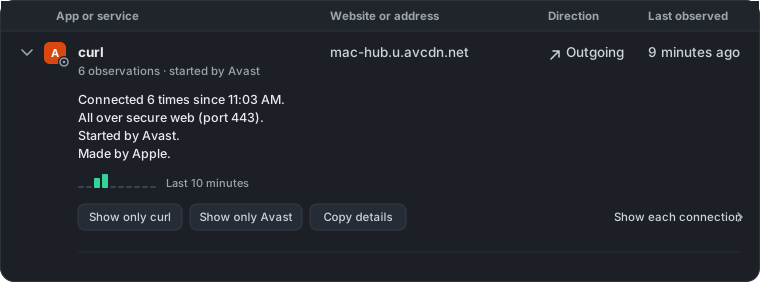
The moment MiniFirewall first sees a program, it looks up the chain of programs that started it, stepping over shells and helper wrappers until it reaches an app. If the chain ends at the system itself, or the parent has already quit, the row says nothing rather than guessing. Nothing is looked up online. The chain is read on your Mac, once per program, the moment it first connects.
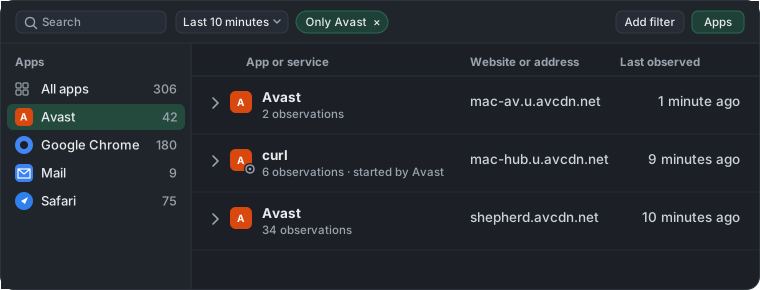
The Apps list beside the traffic counts a tool under the app that started it, so Avast’s curl sits inside Avast’s total, and clicking Avast shows its own rows and everything it ran. A filter under Add filter, “Show only tools run by apps”, lists every such row with the app named on each one. It is the quickest answer to “what do my apps run behind my back”.
Should I block curl?
Usually not. A block on curl stops every app that uses it, including Homebrew, your own scripts and any installer that fetches a file, and it tells you nothing about who was behind the connection you objected to. Block the app that started it instead. In MiniFirewall 1.0.2 a block on an app also covers the programs it runs.
The dialog says so before you confirm: “Also blocks programs that Avast starts, such as a download tool it runs.” The cover only goes one way. A block on curl is a block on curl from any app and never reaches back to the app that ran it. How blocking an app covers the programs it runs has the detail.
If you only object to where curl was sent, block the website. A website block applies to every program on the Mac and leaves the app, and curl, working for everything else. Block a website on Mac walks through it.
When is curl worth worrying about?
Judge curl the way you judge any row: by who started it and where it went. A curl started by an app you trust, contacting that app’s own servers, is that app doing its job. A curl with no starter named, contacting an address you do not recognise, on a schedule, is worth a closer look.
Rows recorded before the 1.0.2 update carry no starter, so an old row saying only curl is not by itself suspicious. Watch for the next one. If the starter is an app you installed, you have your answer. If curl keeps connecting with no app named and the destination means nothing to you, what Mac system traffic is normal explains how to tell the background of macOS from something that deserves a block.
Sources
- The curl project, curl, on what the tool is and where it is used
- Apple, Safely open apps on your Mac, on what a developer’s signature on a program means